

ERP Suites Clarity
ERP Suites Clarity is an integrated solution that helps you proactively monitor your JD Edwards system. It delivers all the benefits of a large, off-the-shelf application monitoring tool but at a fraction of the cost. You’ll love the no-hassle pricing model, as well as continuous enhancements inspired by our own CNCs.

Real-Time Visibility with Clarity
Clarity helps you see what’s happening as it happens. You can confidently report on the health of your JD Edwards environment, identify performance and availability concerns early, and make informed decisions backed by real data.
Built specifically for JD Edwards EnterpriseOne, Clarity removes the guesswork from system monitoring—so your team can move from reactive to proactive system management.
Features include:

A snapshot view of system activity delivered in a single screen
Real-time user analytics that expose performance or availability concerns
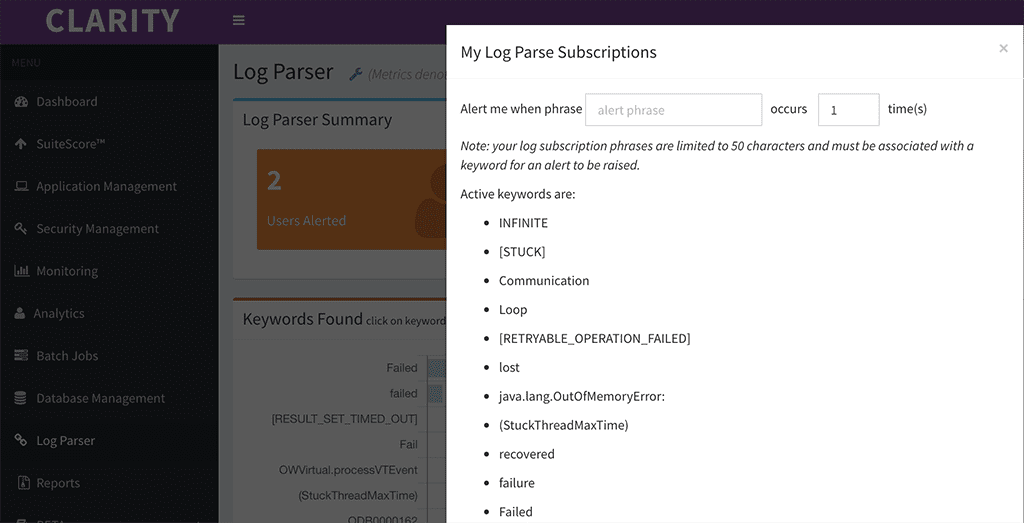
Robust log parsing that helps you identify issues before they affect users
Historical utilization data that reveals trends and informs decision-making
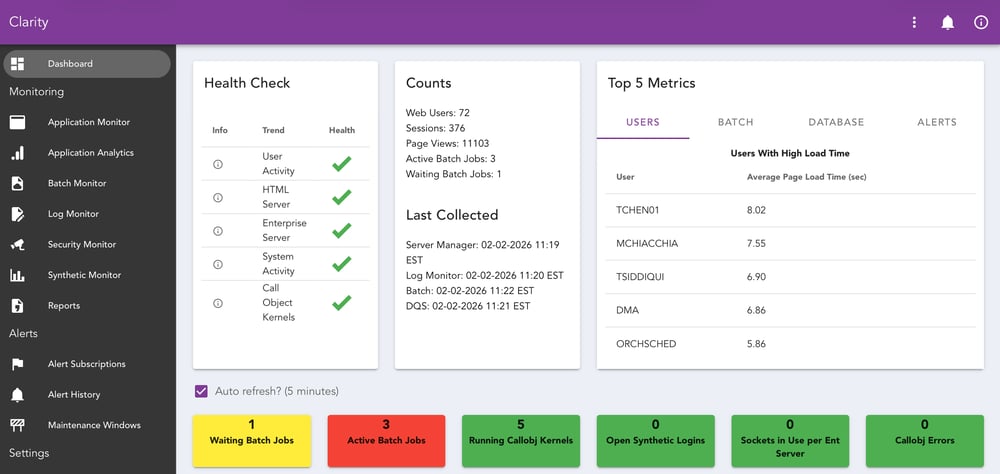
How Clarity Keeps JDE Running at Peak Performance
When you have clear visibility into JD Edwards, performance issues stop being surprises. Clarity gives you an on-demand view of the critical components that impact your ERP, so you can take a proactive approach to system management instead of reacting after users are already affected.
By continuously monitoring user activity, application behavior, and system performance, Clarity helps reduce the risk of costly downtime, shorten troubleshooting cycles, and keep business processes flowing smoothly.
Clarity helps you:
Activate synthetic monitoring
Analyze page load time by user, browser or application
Find expensive database queries
Share data regarding your slowest applications
Review historical data to pinpoint events
How Clarity Can Deliver Actionable Insights and Save You Time
Proactive Log Monitoring for JDE
JD Edwards environments generate thousands of log entries every day, but only a small number indicate real performance or availability issues. The challenge is knowing which ones matter and seeing them early.
Clarity continuously monitors JD Edwards log files for patterns that signal potential problems. Instead of manually searching through logs after users report an issue, teams receive targeted notifications when meaningful events occur.
This proactive approach shortens troubleshooting time and helps prevent issues from escalating into downtime. It’s the same capability used by ERP Suites’ Managed Services teams to identify JD Edwards performance issues early.
Why JD Edwards Teams Choose Clarity

Designed to Protect Uptime
By identifying issues early and surfacing patterns that lead to outages, Clarity helps teams keep JD Edwards running as close to 100% uptime as possible, supporting business continuity and user productivity.

Built for JD Edwards Teams
Clarity understands JD Edwards architecture, workflows, and pain points out of the box, so you get relevant insight without heavy configuration or custom development.

Always-On Monitoring in a Single View
Clarity continuously monitors your JDE 24/7, automatically and consistently. Instead of relying on manual checks or jumping between tools, teams get a single view that surfaces early warning signs as they occur.
The Value ERP Suites Brings
Clarity isn’t just a monitoring tool, it’s the result of more than 20 years of supporting and hosting JD Edwards environments.
ERP Suites uses Clarity every day to support our managed services and hosting customers, monitoring performance, availability, and user experience across real production systems. The same visibility our teams rely on is available to our customers.
Everything our teams have learned during that time—recurring performance issues, common failure patterns, and the early warning signs that lead to outages—has been built directly into Clarity.
Is Clarity Right for You?
Clarity is designed to give JD Edwards teams proactive visibility without unnecessary complexity. While it’s a powerful solution for many organizations, it’s not meant to be everything for everyone.
Here’s how to know if Clarity is the right fit for your environment.
Clarity Is a Great Fit If You…
-
Run JD Edwards EnterpriseOne and need visibility into user activity, application performance, logs, and system health in one place
-
Often hear “JDE is slow” but lack data to quickly pinpoint where and why
-
Spend time manually reviewing logs, batch jobs, or performance metrics after an issue has already occurred
-
Want to identify slow applications, expensive queries, or login issues before they impact the business
-
Support JD Edwards with a lean CNC or IT team

Clarity May Not Be the Best Fit If You…
-
You run an older version of JD Edwards EnterpriseOne (Clarity supports 9.1+)
-
Are looking for a single APM tool to monitor every application, not a JDE-focused solution
-
Prefer to build and maintain custom scripts and monitoring frameworks internally
Get Started with Clarity in Three Simple Steps

Connect Your JDE Environment
Install Clarity’s lightweight, agentless collector and securely connect it to your JD Edwards EnterpriseOne environment. Setup is straightforward and designed to fit into existing infrastructure without disruption.

Gain Immediate Visibility
Once connected, Clarity begins monitoring user activity, application performance, logs, and system behavior in real time, giving your team a clear picture of what’s happening across JD Edwards.

Act with Confidence
Use alerts, insights, and historical data to identify issues early, diagnose root cause faster, and keep JD Edwards running smoothly before problems impact users.
Take the Guesswork Out of JD Edwards Monitoring
You don’t have to wait for users to report issues or spend hours troubleshooting after the fact. With Clarity, JD Edwards teams gain real-time visibility, early warning signals, and the confidence that comes from knowing what’s happening at all times.
The easiest way to understand how Clarity fits your JD Edwards environment is to schedule a short call with our team. We’ll walk through your current setup, discuss the challenges you’re facing, and show you how Clarity provides real-time visibility and early warning signals.